 Qchu
Qchu
Creating a lost pet listing
If your animal is missing, open the listing straight away. It appears in the list for people around you, and closes with one tap when the animal is found.
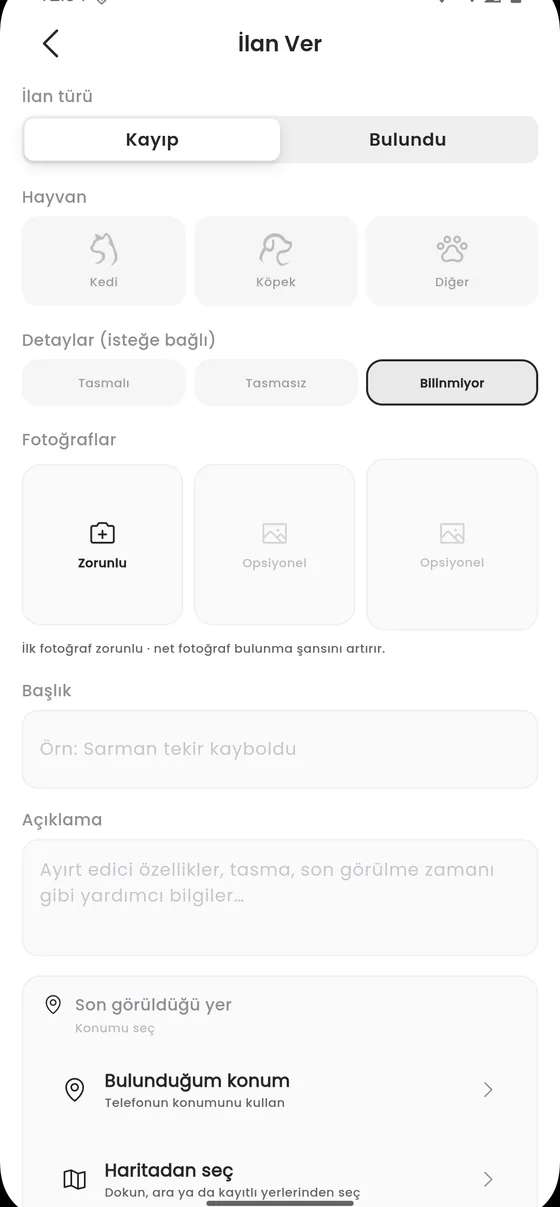
Opening a listing
- Go to the Kayıp (lost) tab in the bottom navigation.
- Tap Kayıp İlanı Ver (post a lost listing).
- Choose the type and the animal details.
- Mark where it was last seen: Telefonun konumunu kullan (use my phone location) or Haritadan seç (pick on the map).
- Add a photo. On a lost listing the photo is the field that works hardest.
- Use İlanı önizle (preview) to check it, then publish.
If you did not grant location
The app does not stop you. It says Konum izni verilmedi. Haritadan seçebilirsin. (location permission not granted, you can pick on the map) and lets you choose the spot by hand.
What makes a good listing
- Use a sharp photo where the face and any distinguishing marks are visible.
- Mark the last seen spot as precisely as you can; the search starts from there.
- Put distinguishing details such as collar, tag and colour in the description.
- Do not write your phone number in the listing text; contact happens through the in app chat.
After it is published
You follow your listing from the İlanlarım screen. You can update it, add photos, close it when the animal is found, or delete it entirely. See Closing a listing.