 Qchu
Qchu
Adding a water and food point
If you saw a water bowl, a food bowl or a feeding station on the street, you can put it on the map. The fields you fill in tell the next person what they will find there.
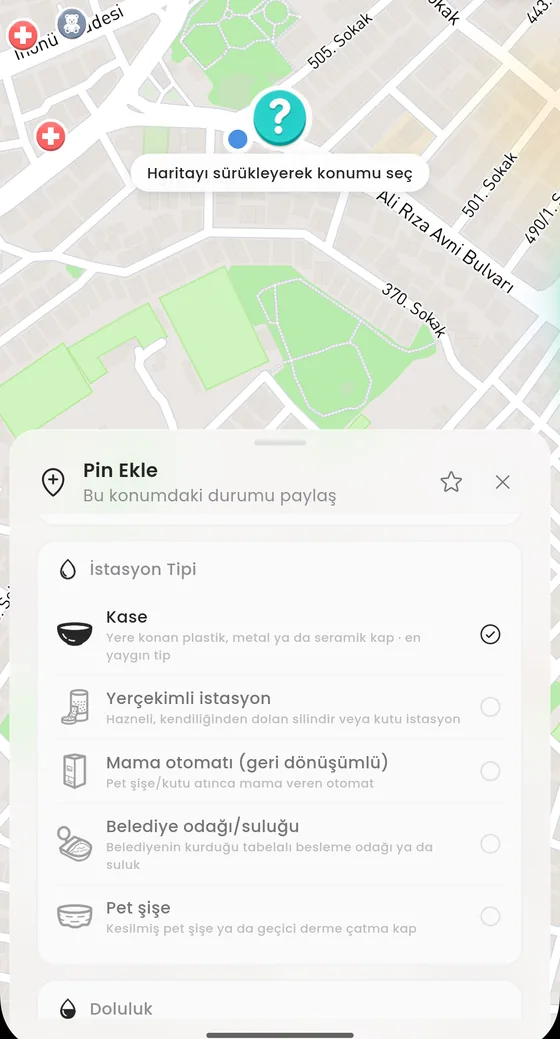
Steps
- On the full map, press and hold at the spot where the bowl is.
- In the Pin Ekle sheet choose Su & Mama.
- Under Tür (kind) pick Su (water), Mama (food) or both. At least one is required.
- Pick the station type (see the list below).
- Mark how full it is. Water and food are asked separately.
- Choose permanence: Sabit (fixed) or Taşınabilir (movable).
- Add a photo if you want, then submit.
Station types
| Kase (bowl) | A plastic, metal or ceramic bowl placed on the ground. The most common type. |
| Yerçekimli istasyon (gravity station) | A cylinder or box station with a reservoir that refills itself. |
| Mama otomatı (food dispenser) | A recycling dispenser that releases food when you drop in a plastic bottle or can. |
| Belediye odağı (municipal spot) | A signposted feeding spot or drinking fountain set up by the municipality. |
| Pet şişe (cut bottle) | A cut plastic bottle or an improvised temporary container. |
How full it is
Fullness has three values: Dolu (full), Yarım (half), Boş (empty). If you pick none, the record is saved as unknown. The field only opens once you have selected water or food above.
Marking an empty bowl as empty is not missing information, it is the most useful information there is. Whoever sees it takes water along.
Permanence and photo
Sabit is for points that cannot be moved: stations set up by a municipality or a housing complex. Taşınabilir is for containers someone put there that may be gone tomorrow. The distinction tells people how much they can rely on the point.
A photo is optional but useful: someone who knows what the bowl looks like finds it faster. Photos go through review and are not shown until approved.
After it is added
The point appears on the map with the water and food icon. Anyone who comes within about 150 metres can update how full it is, so the state stays fresh over time. The pin detail shows when it was reported and how many people contributed.