 Qchu
Qchu
Reporting a wrong or outdated pin
A pin can be wrong, out of date, or against the rules. Those are three different things, and the app handles them in three different places.
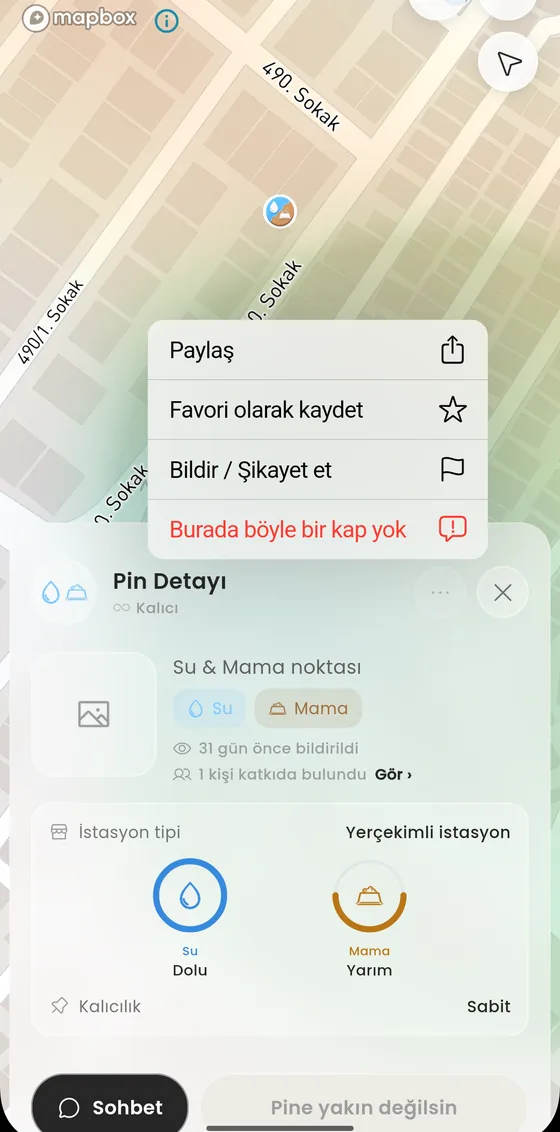
First decide which one it is
| The information is stale | The bowl is there but empty now, or the shelter stands but needs repair. That is not an error, it is an update. |
| The point is gone | There is no bowl or shelter there any more. Report it with Burada böyle bir kap yok (there is no such container here). |
| Rule violation | Fake pin, misleading information, content that harms an animal, an inappropriate photo. Use Bildir / Şikayet et (report). |
Opening the menu
- Tap the pin on the map to open its detail.
- Long press the pin detail. A menu opens: Paylaş (share), Favori olarak kaydet (save as favourite), Bildir / Şikayet et and Burada böyle bir kap yok.
- Pick the one that matches your case.
There is no such container here
This reports that there is no water or food container, or no shelter, at that point. As the app puts it: once enough people report the same thing the pin is removed automatically, and the team reviews it in the meantime. A single report never deletes a pin on its own.
Use it only when you have actually looked. If the bowl is a few metres away, that is a location fix, not a removal.
Report
Used for rule violations. The reason list has six entries:
- Fake pin
- Wrong or misleading information
- Wrong location
- Contains harm to an animal
- Inappropriate photo
- Spam or duplicate pin
The person you report never sees it. The report goes to the team, not to whoever added the pin.
Do not report stale information
A bowl running empty is not a violation, it is how the map works. In that case update the fullness while you are near the pin. See Confirming and updating a pin.